
Try the new Flexlists design
The new Flexlists design is ready to try. Find the switch in your account menu, see what changed, and switch back whenever you like.
There is a new Flexlists design to try today. It gives lists a cleaner header, more room for your work, and quicker access to the controls you use most. The choice is yours: the new design is available now, and you can switch back whenever you want.
Turn it on
- Open Flexlists and sign in.
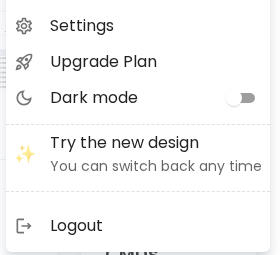
- Click your profile picture in the top right.
- Choose Try the new design. Flexlists will reload with the new look.
The option is in the same account menu on your phone.
What changes
The list header puts your view name and its options together. Your view presets are the first control in the toolbar, so you can switch setups quickly. Filter, sort, fields and other common actions are close at hand on desktop and phone. The phone header can use a compact layout to leave more space for the list.
To return to the familiar layout, open your profile picture again and choose Classic under Design. You can try the new design again at any time.