
Connect an AI agent to Flexlists
Claude, ChatGPT, Cursor, VS Code, n8n and every other app that speaks MCP (Model Context Protocol) can read and work with your lists — with exactly the rights you give them.
https://flexlists.com/mcp1. What it is
The Flexlists MCP server gives an AI agent the tools to work in your Flexlists: find lists, read and filter rows, add and change rows, add fields, build views such as a Kanban or a calendar, attach files, share lists, look at forms and automations. The agent calls these tools itself when you ask it something in plain words.
Ask things like:
It works over the internet (Streamable HTTP, MCP version 2025-06-18) at https://flexlists.com/mcp. Apps that can sign in — claude.ai, Claude Desktop, ChatGPT — only need that address: you sign in to Flexlists and approve. Apps that take a header use an API key.
2. Get a key
1. In Flexlists open Integrations (left menu) → the AI agents (MCP) tab.
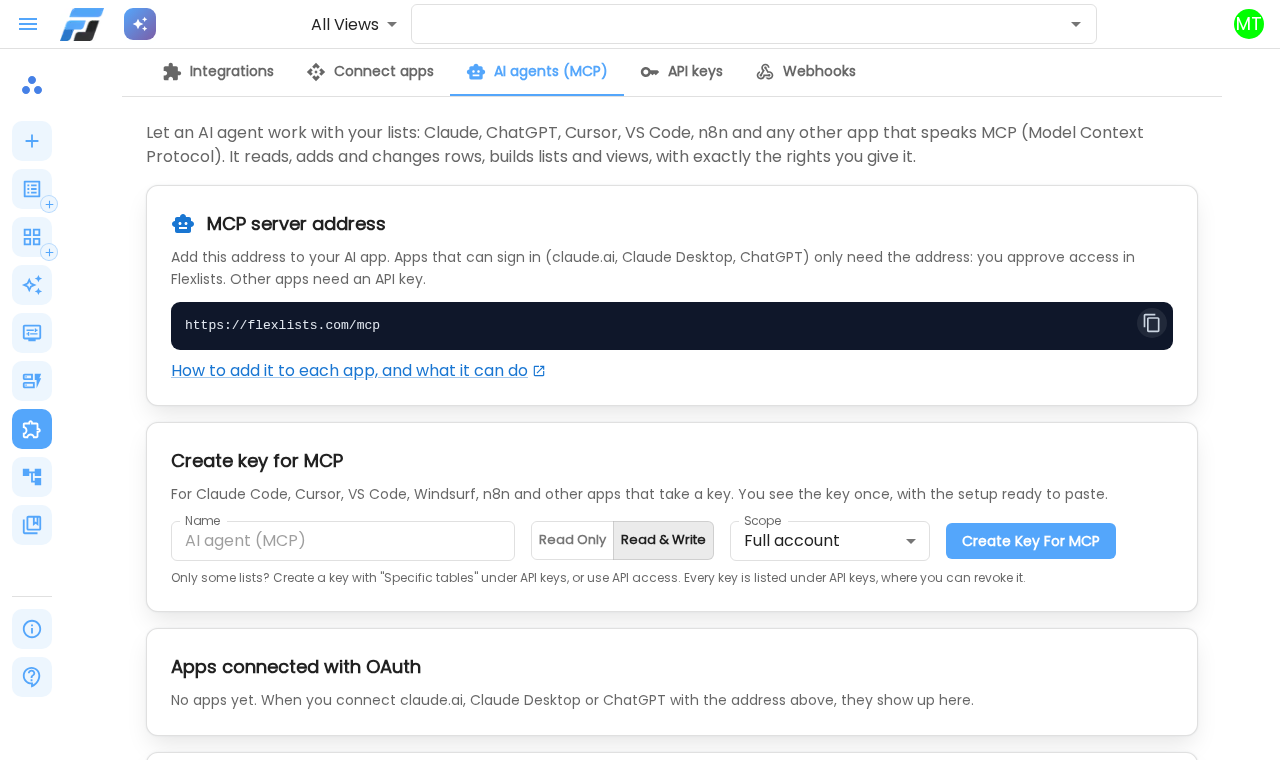
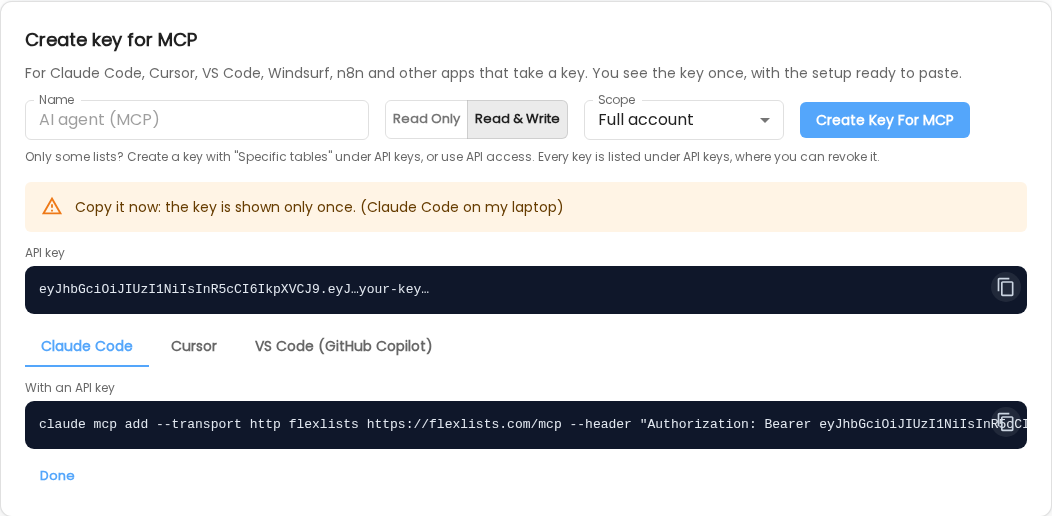
2. Under "Create key for MCP": give it a name, pick Read only or Read & write, and the scope: your full account or one workspace. Click Create key for MCP.

3. Copy the key now — it is shown only once — or copy the ready-made setup for Claude Code, Cursor or VS Code with the key filled in.
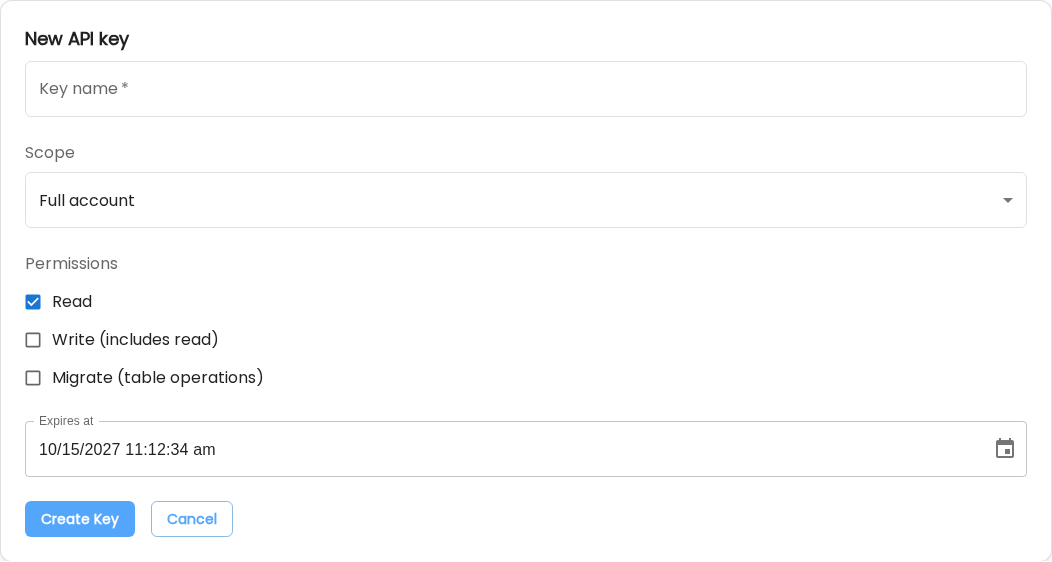
4. A key for some lists only, or with another expiry date: Integrations → API keys → Create new API key, scope "Specific tables", Read or Write, and the expiry date. Every key (also OAuth connections) is listed there and can be revoked.
Keep the key secret like a password. It works until it expires or you revoke it, for the lists in its scope, with your rights on them.
3. Add it to your app
Claude Code API key or OAuth
- Run this in a terminal (add --scope user to use it in every project):
- Check it with claude mcp list, then ask Claude: "which lists do I have in Flexlists?"
claude mcp add --transport http flexlists https://flexlists.com/mcp --header "Authorization: Bearer <your Flexlists API key>"claude mcp add --transport http flexlists https://flexlists.com/mcp4. Use it
Just ask. The agent picks the tools. Good to know: a list is identified by its listId (from list_lists), rows are keyed by field name, and every tool that deletes asks for confirm: true — the agent has to tell you what goes and wait for your yes.
Context
| Tool | What it does | Access | Try |
|---|---|---|---|
whoami | Who the key belongs to, its scope and whether it can write | read | “What can you do in my Flexlists?” |
list_workspaces | The workspaces the key can see | read | “Which workspaces do I have?” |
find_existing | What already exists or is built in for a request: lists, views, forms, apps, widgets, automations, view types, templates, gallery, integrations | read | “Do I already have something to track customers?” |
Lists
| Tool | What it does | Access | Try |
|---|---|---|---|
list_lists | Lists, by workspace, folder or name | read | “Show my lists in the Sales folder” |
get_list_schema | Fields with types, Choice options and relations | read | “Which fields does my CRM have?” |
create_list | A new list with fields and first rows | write | “Make a list for my book collection” |
rename_list | Rename a list or change its description | write | “Rename "Leads 2024" to "Leads"” |
delete_list | Delete a list (asks for confirm) | write · confirm | “Delete the old Test list” |
list_folders | The folders of My Lists and My Views | read | “How are my lists organised?” |
create_folder | A new folder | write | “Make a folder Q4 inside Sales” |
move_to_folder | Move lists and views into a folder | write | “Put the CRM in the Sales folder” |
list_templates | List and view templates | read | “Which templates are there for projects?” |
create_from_template | A list (+ view) from a template | write | “Start a sales pipeline from the template, without demo data” |
Fields
| Tool | What it does | Access | Try |
|---|---|---|---|
add_field | Add a field, also a Link to another list (two-way) | write | “Add a Priority field with Low, Medium, High” |
add_rollup_field | Sum / average / … of a field of the linked rows, optionally filtered | write | “Show the total paid amount of each client's invoices” |
add_count_field | Number of linked rows, optionally filtered | write | “Count the open invoices per client” |
add_lookup_through_link_field | The values of a field of the linked rows | write | “Show each order's customer e-mail” |
add_formula_field | A Formula field, from a description (Flexlists writes and checks it) or an expression | write | “Add a field that shows how many days each animal has been in the shelter” |
explain_formula | What a formula computes, in plain words | read | “What does the Days in shelter formula do?” |
update_field | Rename, required, description, Choice options, a formula and its row order, or the type (preview first; values that would be lost need your OK) | write | “Make the Qty field a number” |
delete_field | Delete a field (asks for confirm) | write · confirm | “Remove the Fax field” |
Rows
| Tool | What it does | Access | Try |
|---|---|---|---|
search_rows | Filter, full-text search, sort, page with a cursor | read | “Which tasks are overdue?” |
get_row | One row by id | read | “Show me order 1043” |
create_rows | Add up to 100 rows | write | “Add a row to my CRM for Acme” |
link_rows | Link a row to rows of another list, by id or name (set / add / remove) | write | “Add Ann and Bob to the Website project” |
update_rows | Change up to 100 rows (only the given fields) | write | “Mark the Acme deal as won” |
delete_rows | Delete up to 100 rows (asks for confirm) | write · confirm | “Delete the duplicate contacts” |
count_rows | How many rows match a filter | read | “How many open tickets are there?” |
aggregate_rows | Count / sum / avg / min / max, grouped by a field or month | read | “Total deal value per stage” |
Views
| Tool | What it does | Access | Try |
|---|---|---|---|
list_views | The views of a list | read | “Which views does the Tasks list have?” |
list_view_types | The view types and the fields they need | read | “Which views could I make for my events?” |
create_view | Kanban, Calendar, Timeline, Gantt, Map, Gallery, Chart, Mind map, Storyboard, Sticky notes, … | write | “Build a Kanban for my hiring pipeline” |
get_view_rows | Rows as a view filters and sorts them | read | “What is in my "This week" view?” |
create_checklist | A checklist (items, runs, results + view) | write | “Make a weekly safety checklist” |
Comments & history
| Tool | What it does | Access | Try |
|---|---|---|---|
list_comments | The comments on a row | read | “What did the team say about Acme?” |
add_comment | Comment on a row | write | “Note on Acme that they want a quote by Friday” |
get_row_history | Who changed what, recently | read | “Who changed the price of this product?” |
list_snapshots | The saved versions of a whole list (List history) | read | “When was the CRM last saved as a version?” |
Files
| Tool | What it does | Access | Try |
|---|---|---|---|
attach_file_to_row | A file from a URL (25 MB) or base64 (5 MB) | write | “Attach this PDF to the Acme contract row” |
get_file | Download links (1 hour) of a row's files | read | “Give me the invoice of order 1043” |
read_spreadsheet | Columns and first rows of a CSV / XLSX | read | “What is in this spreadsheet? (URL)” |
import_spreadsheet_rows | Add a CSV / XLSX to a list | write | “Import these leads into my CRM” |
create_list_from_spreadsheet | A new list from a CSV / XLSX or a Google Sheets link (every sheet a linked list with linkedSheets) | write | “Turn this spreadsheet into a list” |
Sharing & groups
| Tool | What it does | Access | Try |
|---|---|---|---|
get_sharing | Who has access to a list | read | “Who can see the Salaries list?” |
share_list | Share a list by email | write | “Let ann@example.com edit the CRM” |
share_list_with_group | Share a list with a group | write | “Give the Sales group read access to Leads” |
set_share_role | Change someone's role on a list | write | “Make Bob read-only on the CRM” |
unshare | Take away access (asks for confirm) | write · confirm | “Remove Bob from the CRM” |
list_groups | Your groups and their members | read | “Who is in the Sales group?” |
create_group | A new group | write | “Make a group Volunteers with these emails” |
update_group | Rename a group | write | “Rename Sales to Sales EU” |
delete_group | Delete a group (asks for confirm) | write · confirm | “Delete the old Interns group” |
add_group_members | Add people to a group | write | “Add cy@example.com to Sales” |
remove_group_member | Remove someone from a group (asks for confirm) | write · confirm | “Take Bob out of Sales” |
Forms
| Tool | What it does | Access | Try |
|---|---|---|---|
list_forms | Your forms with their public links | read | “Which forms do I have?” |
get_form | A form's questions, lists and public URL | read | “What does the signup form ask?” |
create_form | A public form, planned and built by AI | write | “Make a signup form for the open day” |
list_form_submissions | The latest submissions | read | “Who signed up today?” |
set_form_enabled | Turn a form on or off | write | “Close the signup form” |
Automations & apps
| Tool | What it does | Access | Try |
|---|---|---|---|
list_automations | Your integrations and workflows | read | “Which automations are on?” |
create_automation | A link to the builder with your request | write | “Mail me the open tasks every Monday” |
set_automation_enabled | Switch an automation on or off | write | “Pause the Slack notification” |
run_automation | Run an automation now | write | “Run the weekly report now” |
list_applications | Your applications and their links | read | “Which apps did I build?” |
create_application | A link to the app builder with your request | write | “Build a portal where volunteers pick shifts” |
Webhooks
| Tool | What it does | Access | Try |
|---|---|---|---|
list_webhooks | Your row-change webhooks | read | “Which webhooks are set up?” |
create_webhook | Send row changes to a URL | write | “Post new orders to https://hooks.example.com/orders” |
get_webhook | One webhook and its last deliveries | read | “Did the orders webhook deliver today?” |
test_webhook | Send a test ping now | write | “Test the orders webhook” |
update_webhook | Change its events or URL, switch it on or off | write | “Also send updated rows to the orders webhook” |
delete_webhook | Remove a webhook (asks for confirm) | write · confirm | “Remove the old orders webhook” |
List locks
| Tool | What it does | Access | Try |
|---|---|---|---|
lock_lists | Lock lists for a read-modify-write: nobody else writes to them until you release (write exclusion, not a transaction) | write | “Move 2 chairs from Warehouse to Orders without anyone changing the stock meanwhile” |
get_lock | A lock's status; waits until a queued lock is held | read | “Is my lock on Warehouse granted yet?” |
extend_lock | Keep holding a lock a little longer | write | “Keep the lock on the ledger for another 30 seconds” |
release_lock | End a lock (always, when done) | write | “Release the lock on Warehouse and Orders” |
Help
| Tool | What it does | Access | Try |
|---|---|---|---|
explain_item | How an automation, form, app or view template works | read | “Why is my Telegram integration off?” |
contact_support | File a ticket with the Flexlists team | write | “Report to support that my import fails” |
| Tool | What it does | Access | Try |
|---|---|---|---|
send_email | Send an email from the workspace (WorkflowEmail): held / sent / skipped by the plan | write | “Email ann@example.com that her order ships today” |
Filters
search_rows, count_rows and aggregate_rows take where, the same syntax as the REST API's row search: field name → value (equals), or { "op": …, "value": … } with eq, neq, contains, gt, gte, lt, lte, empty, notEmpty. All conditions must hold. query searches the text fields.
{
  "listId": 1234,
  "where": {
    "Status": "Open",
    "Due": {
      "op": "lt",
      "value": "2025-01-31"
    }
  },
  "sort": "Due",
  "limit": 50
}
Pagination
At most 200 rows per call. When a result has a nextCursor, the agent asks again with cursor for the next page. Every result stays under 1 MB: a page with very long texts comes back shorter, with a note, and continues with the cursor.
Files
attach_file_to_row takes a public http(s) URL (Flexlists downloads it, up to 25 MB; private and internal addresses are refused) or base64 content up to 5 MB. get_file returns download links that work for one hour — the bytes never go through the chat. Spreadsheets (CSV, XLSX) are read and imported on the server from a URL or a file already in Flexlists.
Relations
A Link to another list (LinkedRecord) comes back as [{ "id": 12, "label": "Acme" }]. To set one, give row ids, { "id": 12 } or labels ("Acme", matched in the linked list); link_rows adds or removes links of one row. A link is always two-way: add_field with type LinkedRecord also makes the field on the other list. An old relation (Lookup) field comes back as { "id": 12, "label": "Acme" }. get_list_schema shows which list a relation points to.
add_rollup_field (a sum, average, count, … of a field of the linked rows, optionally only rows that match a filter), add_count_field and add_lookup_through_link_field add computed fields through a link. Flexlists keeps them up to date; they are read only (readOnly: true and computed in get_list_schema).
Field types
add_field and create_list take every field type of Flexlists (any case; common words such as “checkbox”, “currency” or “stars” are understood, an unknown type is an error). Read-only types are filled in by Flexlists: a value sent for one is refused.
Text | short text: names, titles, handles, codes |
LongText | notes, descriptions, bios, comments (several lines) |
Markdown | formatted text (markdown) |
HTML | HTML text |
Link | a web address (URL): website, profile link, source post |
Email | an e-mail address (checked, opens a mail) |
Phone | a phone / mobile / WhatsApp number (checked, opens a call) |
Barcode | a barcode / QR code: EAN, SKU code, ticket code (shown as a barcode) |
Integer | whole numbers: counts, quantities, stock, scores |
Decimal | numbers with decimals: measurements, weights |
Money | amounts of money: price, cost, revenue, budget |
Percentage | percentages: discount, progress, rate |
Rating | a rating of 1 to N stars ("max", default 5): rating, stars, review score |
Duration | a length of time: duration, time spent, run time (shown as 1:20 / "1h 20m") |
Autonumber | a number Flexlists gives each new row: ticket number, invoice number, order no. (read only) — read only |
Formula | computed from the row's own fields (read only) — read only |
Boolean | yes / no, a checkbox: done, paid, contacted, answered, in stock |
Choice | ONE of a fixed set: status, stage, category, priority, type |
MultiChoice | SEVERAL of a fixed set: tags, labels, skills |
Date | a day: date added, due date, birthday, launch date |
Time | a time of day |
DateTime | a moment: a date with a time, a timestamp |
CreatedTime | when the row was made, filled in by Flexlists (read only): created, date added (automatic) — read only |
ModifiedTime | when the row was last changed, filled in by Flexlists (read only) — read only |
CreatedBy | who made the row, filled in by Flexlists (read only) — read only |
ModifiedBy | who last changed the row, filled in by Flexlists (read only) — read only |
Image | pictures, photos, logos |
File | documents, attachments |
Color | a colour |
User | a person of the workspace: assignee, owner, responsible |
Lookup | ONE row of another list (a Link to another list that links one row) |
LinkedRecord | rows of ANOTHER list, two-way ("Link to another list") |
Rollup | a total over linked rows: sum / average / min / max of a field of the rows a Link links (read only) — read only |
Count | the number of linked rows (read only) — read only |
LinkedLookup | the values of a field of the linked rows (read only) — read only |
Button | a button on each row that opens a web address ("url", {Field} = the row's value) or runs an automation — read only |
Resources and prompts
Resources: flexlists://lists, flexlists://list/{listId}/schema and flexlists://docs/llm — the guide for agents (plain markdown). Prompts: analyze_list, build_tracker (“make me a list for …”), import_data.
5. Permissions & safety
- Scope. A key (or OAuth connection) reaches your whole account, one workspace, or specific lists — never more. Lists outside it do not exist for the agent, also not in searches or resources.
- Read only. A read-only key sees every tool, but a tool that changes data answers “this key is read-only”.
- Your rights. The agent works as you: what you may not do in the app (e.g. change fields of a list you can only edit rows in, or only add rows as AddOnly), it may not do either.
- API access configurations. A key of an API access configuration only reaches its own lists, with its permission per list (Read / Add / Edit / Full), its view and its endpoint allowlist — exactly like the REST API.
- Destructive tools (delete rows, lists or fields, unshare, delete groups or webhooks) need
confirm: true: the agent must name what goes and get your yes first. Deleted rows can be undone in the app. - Revoke a key under Integrations → API keys, and an OAuth connection under Integrations → AI agents (MCP) → Apps connected with OAuth (it is also in the API keys list). It stops at once.
- Rate limit: 600 requests per minute per key. Every tool call is logged with its key, tool, result and duration (never your data) — see the usage on the AI agents (MCP) tab.
6. Troubleshooting
| 401 | No key, a wrong or revoked key, or an expired key. A login token of the website does not work: use an API key. OAuth apps sign in again by themselves. |
| 403 | The key may not do this: the list is outside its scope, the configuration does not allow it, or the IP address is not on its allowlist. |
| 429 | More than 600 requests in a minute: wait the seconds in Retry-After. |
| Tool not listed | Reload the server in your app (Claude Code: claude mcp list; Cursor: Settings → MCP). Some apps only show a limited number of tools, or let you switch tools on and off. |
| Behind a proxy | Every answer is plain JSON on its POST, so proxies that buffer server-sent events are no problem. A proxy must let the Authorization header through. |
Test the connection with the MCP Inspector:
npx @modelcontextprotocol/inspector --cli https://flexlists.com/mcp --transport http --header "Authorization: Bearer <your Flexlists API key>" --method tools/listOr run npx @modelcontextprotocol/inspector, choose “Streamable HTTP”, enter https://flexlists.com/mcp and either an Authorization header or “Open Auth Settings” → Quick OAuth Flow.
More: the REST API reference · the guide for agents (markdown) · Integrations → AI agents (MCP)